
 BChoudhury-msandnishthaAhujaa
2417da152d
BChoudhury-msandnishthaAhujaa
2417da152d
* Initial dev for container copy

* remove padding from label

* Added Copy Job prerequisites screen

* Added hooks to evaluate reader role access

* added copyjob pre-requsite screen along with it's validations

* Added monitor copy job list screen

* added copy job list refresh and reset functionality

* remove arm token dependency

* fetch account details from account id instead of context

* Fix lint & typescript checks

* show copyjob screen from portal navigation

* adding copy job details screen

* remove duplicate code & show sql accounts only

* ui fixes for list job page

* pending icon

* copy job details screen ui

* reset .vscode/settings.json

* Fixed existing UTs

* disabling action buttons until it's in progress

* fixed formatting

* Adding loader on submit button and show job creation errors in the panel itself

* updating disabling action menu item logic

* added custom pager

* fix lint and ts errors

* updating file names and removing comments

* remove comments

* modularize the arom common code

* Adding content and removing tooltip

* updating job details screen

* updating online copy enabled screen

* Adding below changes
- Don't show permission screen for same account in offline mode
- Don't show identity permissions for same account in online mode
- Show error message if selected containers are identical
- Update abort signal messages

* added feedback code from explorer

* Add tooltips and long polling
- Added tooltips to permission sections
- Implemented long polling for PITR and online copy enabled sections
- Long polling automatically stops after 15 minutes
- After polling ends, a refresh button will be displayed

---------

Co-authored-by: nishthaAhujaa <[email protected]>
Cosmos DB Explorer
UI for Azure Cosmos DB. Powers the Azure Portal, https://cosmos.azure.com/, and the Cosmos DB Emulator

Getting Started
npm installnpm run build
Developing
Watch mode
Run npm start to start the development server and automatically rebuild on changes
Hosted Development (https://cosmos.azure.com)
- Visit:
https://localhost:1234/hostedExplorer.html - The default webpack dev server configuration will proxy requests to the production portal backend:
https://cdb-ms-mpac-pbe.cosmos.azure.com. This will allow you to use production connection strings on your local machine.
Emulator Development
- Start the Cosmos Emulator
- Visit: https://localhost:1234/index.html
Setting up a Remote Emulator
The Cosmos emulator currently only runs in Windows environments. You can still develop on a non-Windows machine by setting up an emulator on a windows box and exposing its ports publicly:
-
Expose these ports publicly: 8081, 8900, 8979, 10250, 10251, 10252, 10253, 10254, 10255, 10256
-
Download and install the emulator: https://docs.microsoft.com/en-us/azure/cosmos-db/local-emulator
-
Start the emulator from PowerShell:
> cd C:/

> .\CosmosDB.Emulator.exe -AllowNetworkAccess -Key="<EMULATOR MASTER KEY>"
Portal Development
- Visit: https://ms.portal.azure.com/?dataExplorerSource=https%3A%2F%2Flocalhost%3A1234%2Fexplorer.html
- You may have to manually visit https://localhost:1234/explorer.html first and click through any SSL certificate warnings
Testing
Unit Tests
Unit tests are located adjacent to the code under test and run with Jest:
npm run test
End to End CI Tests
Jest and Puppeteer are used for end to end browser based tests and are contained in test/. To run these tests locally:
- Copy .env.example to .env
- Update the values in .env including your local data explorer endpoint (ask a teammate/codeowner for help with .env values)
- Make sure all packages are installed
npm install - Run the server
npm run startand wait for it to start - Run
npm run test:e2e
Releasing
We generally adhere to the release strategy documented by the Azure SDK Guidelines. Most releases should happen from the master branch. If master contains commits that cannot be released, you may create a release from a release/ or hotfix/ branch. See linked documentation for more details.
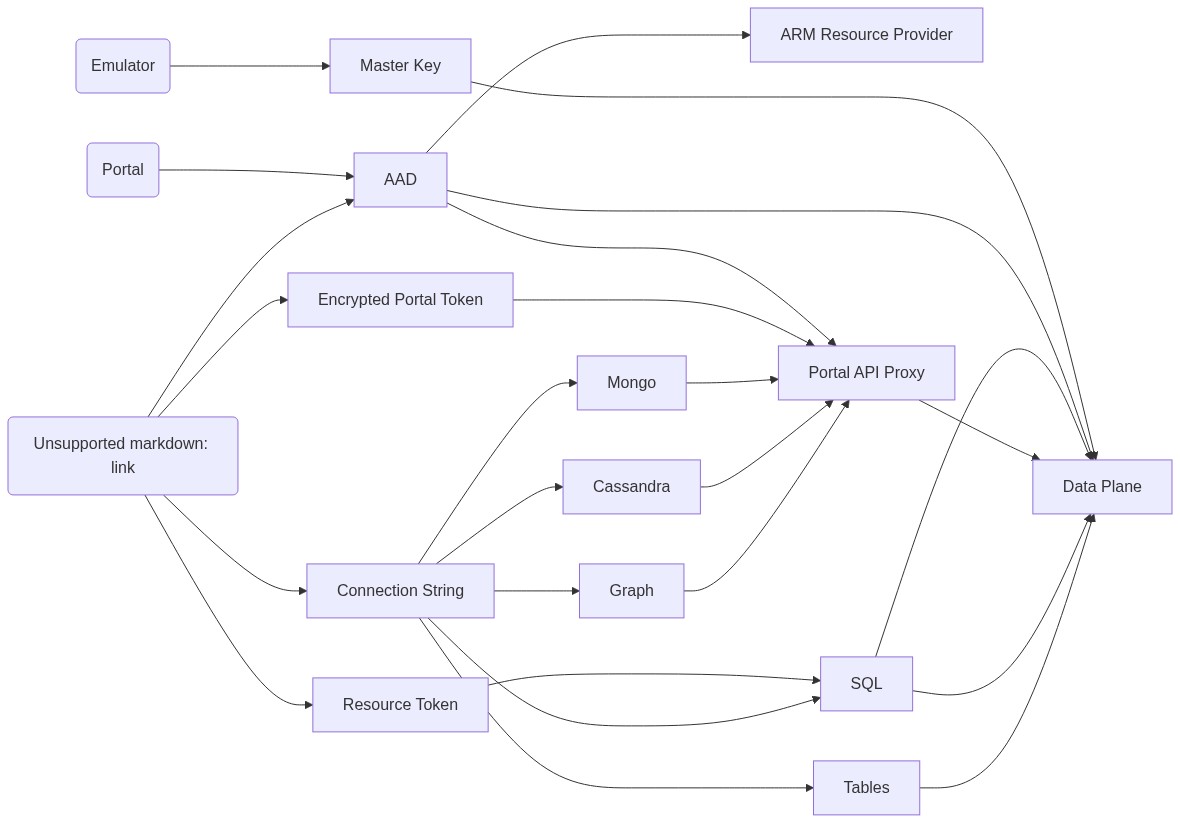
Architecture
Contributing
Please read the contribution guidelines.