 Dmitrii Shilov
3b2efdb043
Dmitrii Shilov
3b2efdb043
The previous revision removed the missing-phase signatures, but three of those
changes could report a load as healthy without establishing that it finished,
and one could prevent a slow initialization from recovering.

Preserve late initialization recovery. configurePortal() raced the iframe
handshake against a 30s reject while leaving the message listener active, so a
late init message would build an Explorer that the rejected caller never
received — turning a slow load into an unrecoverable one. The timeout is now a
watchdog that traces the stuck handshake and lets the caller keep waiting, so
recovery behaves as it did before. Initialization work inside the message
handler is wrapped so a throw reports and still yields a shell, instead of
leaving the promise pending forever.

Do not accept an earlier render as proof the loaded tree is ready. Phase
auto-start let a render of the databases-only tree complete DatabaseTreeRendered
with a zero-duration measurement, before collections had loaded. The producer
ordering is fixed instead: Explorer publishes a ready revision once the load has
produced the data the tree should show, and ResourceTree completes the phase only
for a render carrying that revision, acknowledging each revision once. Stale
callbacks from a superseded load, accounts with no databases and unchanged trees
are covered by tests. A completion for a phase that was never opened is now
refused and reported as phase_complete_unstarted rather than backdated, and the
early-completion buffer no longer accepts deferred phases, which must be opened
by their producer.

Do not turn unfinished background loads into successes. A timeout in a hidden tab
emitted healthy=true even with no phases completed. The emitted outcome again
reflects what actually happened; documentHidden continues to be reported so
alerting can apply a background policy without the load being relabelled.

Related: IcM 865096261
Cosmos DB Explorer
UI for Azure Cosmos DB. Powers the Azure Portal, https://cosmos.azure.com/, and the Cosmos DB Emulator

Getting Started
- Install Node.js 22.x.
npm installnpm run build
Developing
Watch mode
Run npm start to start the development server and automatically rebuild on changes
Hosted Development (https://cosmos.azure.com)
- Visit:
https://localhost:1234/hostedExplorer.html - The default webpack dev server configuration will proxy requests to the production portal backend:
https://cdb-ms-mpac-pbe.cosmos.azure.com. This will allow you to use production connection strings on your local machine.
Emulator Development
- Start the Cosmos Emulator
- Visit: https://localhost:1234/index.html
Setting up a Remote Emulator
The Cosmos emulator currently only runs in Windows environments. You can still develop on a non-Windows machine by setting up an emulator on a windows box and exposing its ports publicly:
-
Expose these ports publicly: 8081, 8900, 8979, 10250, 10251, 10252, 10253, 10254, 10255, 10256
-
Download and install the emulator: https://docs.microsoft.com/en-us/azure/cosmos-db/local-emulator
-
Start the emulator from PowerShell:
> cd C:/

> .\CosmosDB.Emulator.exe -AllowNetworkAccess -Key="<EMULATOR MASTER KEY>"
Portal Development
- Visit: https://ms.portal.azure.com/?dataExplorerSource=https%3A%2F%2Flocalhost%3A1234%2Fexplorer.html
- You may have to manually visit https://localhost:1234/explorer.html first and click through any SSL certificate warnings
Testing
Unit Tests
Unit tests are located adjacent to the code under test and run with Jest:
npm run test
End to End CI Tests
Jest and Puppeteer are used for end to end browser based tests and are contained in test/. To run these tests locally:
- Copy .env.example to .env
- Update the values in .env including your local data explorer endpoint (ask a teammate/codeowner for help with .env values)
- Make sure all packages are installed
npm install - Run the server
npm run startand wait for it to start - Run
npm run test:e2e
Releasing
We generally adhere to the release strategy documented by the Azure SDK Guidelines. Most releases should happen from the master branch. If master contains commits that cannot be released, you may create a release from a release/ or hotfix/ branch. See linked documentation for more details.
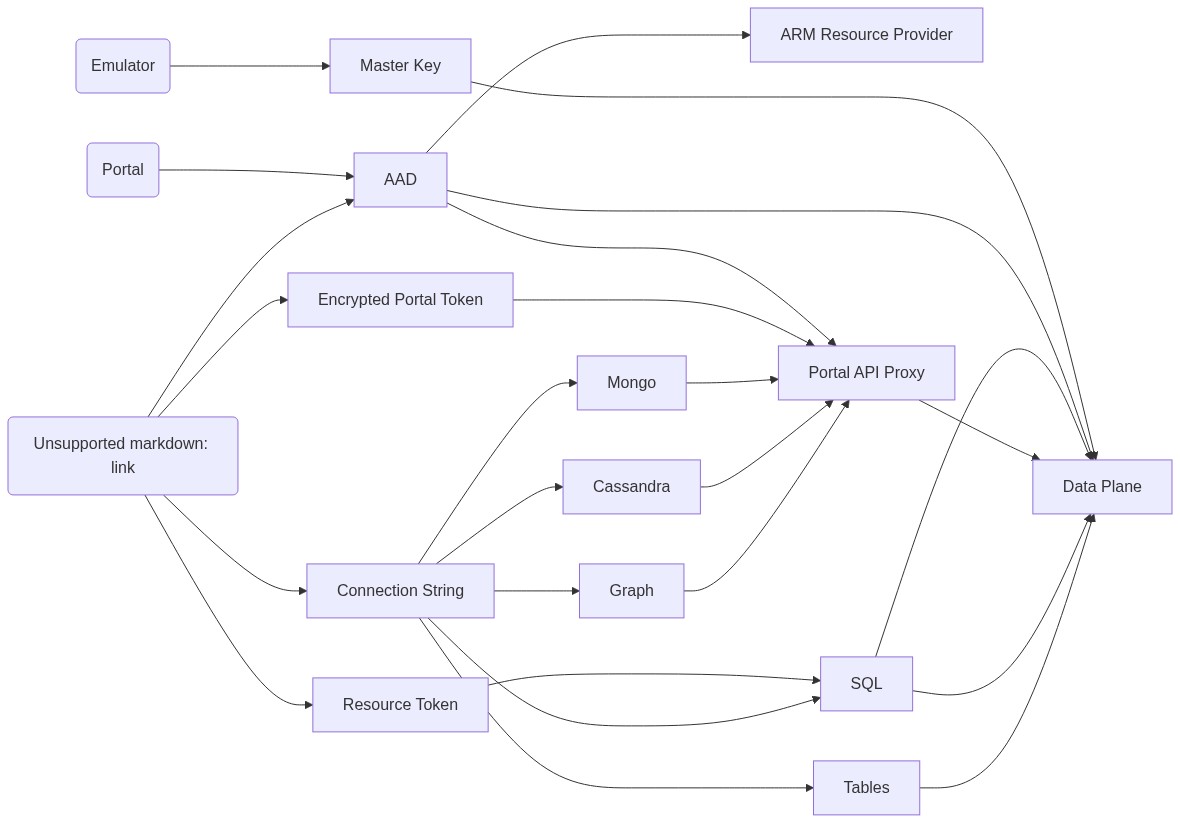
Architecture
Contributing
Please read the contribution guidelines.