 sunghyunkang1111
40e8dee357
sunghyunkang1111
40e8dee357
* ci: route Playwright reports through private Azure Storage container

Replaces the public `/playwright-reports/*` static-website uploads and all GitHub Actions artifact uploads for Playwright traces/videos/blob-reports with uploads to a new private container `playwright-reports` on the same storage account. PR comments now link to an Azure Portal blob-properties deep link (requires AAD sign-in) instead of the previously anonymous static-site URL.

Fixes MSRC finding: Playwright traces captured on test failure embed Authorization: Bearer headers, and the existing publish path made them anonymously downloadable. The new private container is RBAC-gated (Storage Blob Data Reader/Contributor at container scope) and the storage account already has anonymous blob access and shared-key access disabled.

* ci: TEMP smoke-test single Playwright spec to validate MSRC plumbing

Reduces the Playwright matrix to 1 shard and restricts the run to a single test in the searchableDropdown component fixture on Chrome. The fixture hits the local dev server only, so no Cosmos auth and no token captures happen \u2014 isolates the smoke test to the new Azure Storage upload/download/zip/PR-comment plumbing.

REVERT THIS COMMIT before merging the parent PR.

* ci: grant id-token: write to merge-playwright-reports job

The merge job overrides workflow-level permissions with its own block (contents: read, pull-requests: write), which silently drops the workflow-level id-token: write. Without it, Azure/login@v2 cannot fetch the federated OIDC token and fails.

Bug introduced when the Az login was relocated from the deleted publish-playwright-report job (which had id-token: write) into the merge job.

* ci: trigger re-run after RBAC propagation

* ci: trigger re-run after E2E_TESTS_CLIENT_ID SP grant

* ci: flatten downloaded shard reports before merge

az storage blob download-batch preserves the full blob path, but playwright merge-reports expects .zip files directly in the target directory. Flatten with find + mv after download.

* ci: switch PR comment to ContainerMenuBlade deep link

BlobPropertiesBladeV2 requires undocumented 'tabToload' and 'isDeleted' params we couldn't get past the Portal's grammar validator. ContainerMenuBlade has no required params and drops users directly into the playwright-reports container, where they navigate to \{run_id}-{attempt}/report.zip\ (one extra click vs. blob-direct).

* ci: make report path more prominent in PR comment

Surface the {run_id}-{attempt}/report.zip path on its own line so reviewers can copy-paste it into the Portal search instead of scanning the navigation prose.

* Revert "ci: TEMP smoke-test single Playwright spec to validate MSRC plumbing"

This reverts commit 308005f02ba9ea7c4abc5d9f4f6c089e2ff96a85.

* ci: refresh OIDC token before shard upload

GitHub OIDC client assertions are valid for only 5 minutes (JWT iat -> exp window). Playwright shards that take >5 min exhaust the validity window before the upload step runs, causing AADSTS700024 'Client assertion is not within its valid time range'. Add a fresh Azure/login@v2 step right before the upload to mint a new OIDC token.
Cosmos DB Explorer
UI for Azure Cosmos DB. Powers the Azure Portal, https://cosmos.azure.com/, and the Cosmos DB Emulator

Getting Started
npm installnpm run build
Developing
Watch mode
Run npm start to start the development server and automatically rebuild on changes
Hosted Development (https://cosmos.azure.com)
- Visit:
https://localhost:1234/hostedExplorer.html - The default webpack dev server configuration will proxy requests to the production portal backend:
https://cdb-ms-mpac-pbe.cosmos.azure.com. This will allow you to use production connection strings on your local machine.
Emulator Development
- Start the Cosmos Emulator
- Visit: https://localhost:1234/index.html
Setting up a Remote Emulator
The Cosmos emulator currently only runs in Windows environments. You can still develop on a non-Windows machine by setting up an emulator on a windows box and exposing its ports publicly:
-
Expose these ports publicly: 8081, 8900, 8979, 10250, 10251, 10252, 10253, 10254, 10255, 10256
-
Download and install the emulator: https://docs.microsoft.com/en-us/azure/cosmos-db/local-emulator
-
Start the emulator from PowerShell:
> cd C:/

> .\CosmosDB.Emulator.exe -AllowNetworkAccess -Key="<EMULATOR MASTER KEY>"
Portal Development
- Visit: https://ms.portal.azure.com/?dataExplorerSource=https%3A%2F%2Flocalhost%3A1234%2Fexplorer.html
- You may have to manually visit https://localhost:1234/explorer.html first and click through any SSL certificate warnings
Testing
Unit Tests
Unit tests are located adjacent to the code under test and run with Jest:
npm run test
End to End CI Tests
Jest and Puppeteer are used for end to end browser based tests and are contained in test/. To run these tests locally:
- Copy .env.example to .env
- Update the values in .env including your local data explorer endpoint (ask a teammate/codeowner for help with .env values)
- Make sure all packages are installed
npm install - Run the server
npm run startand wait for it to start - Run
npm run test:e2e
Releasing
We generally adhere to the release strategy documented by the Azure SDK Guidelines. Most releases should happen from the master branch. If master contains commits that cannot be released, you may create a release from a release/ or hotfix/ branch. See linked documentation for more details.
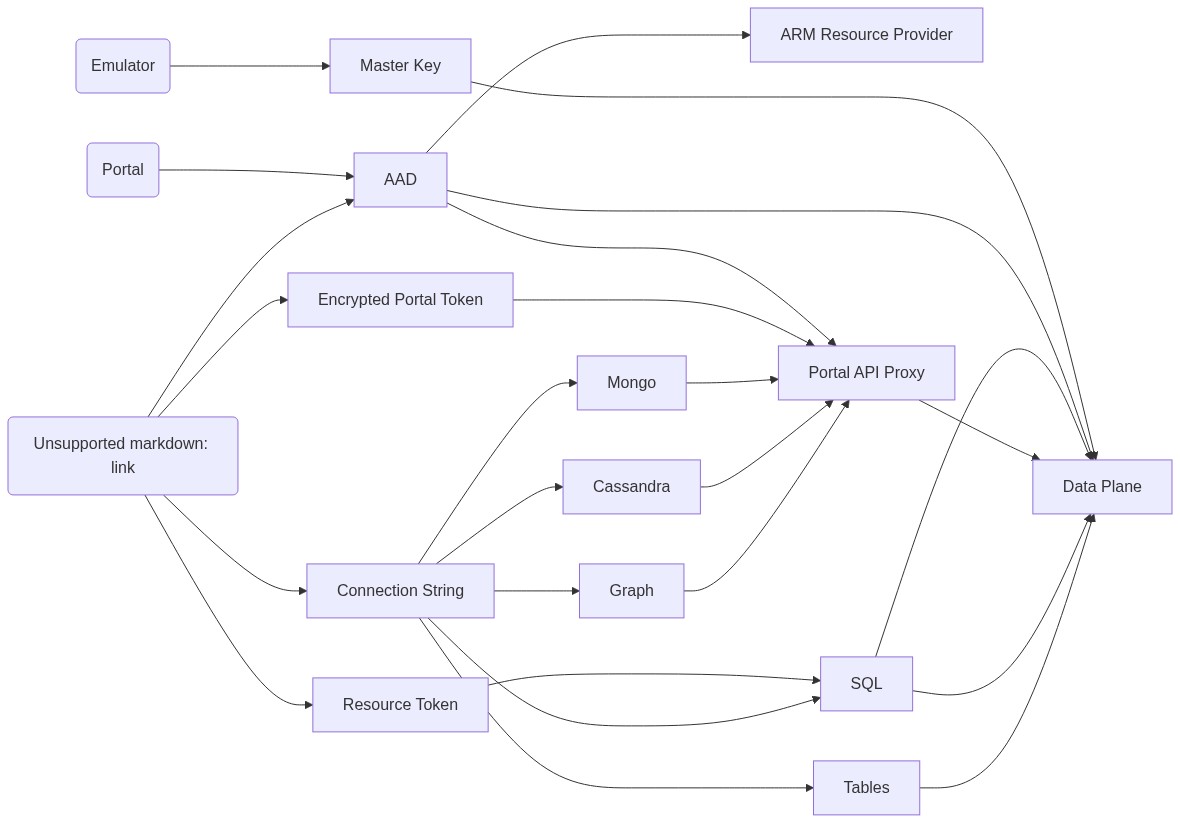
Architecture
Contributing
Please read the contribution guidelines.